Evidence and reports
Every measured value is stored with a timestamp and can be exported as a CSV file. This provides reports for committees, key figures for energy management under the EnEfG or ISO 50001 and documents for the proof of use.
Platform
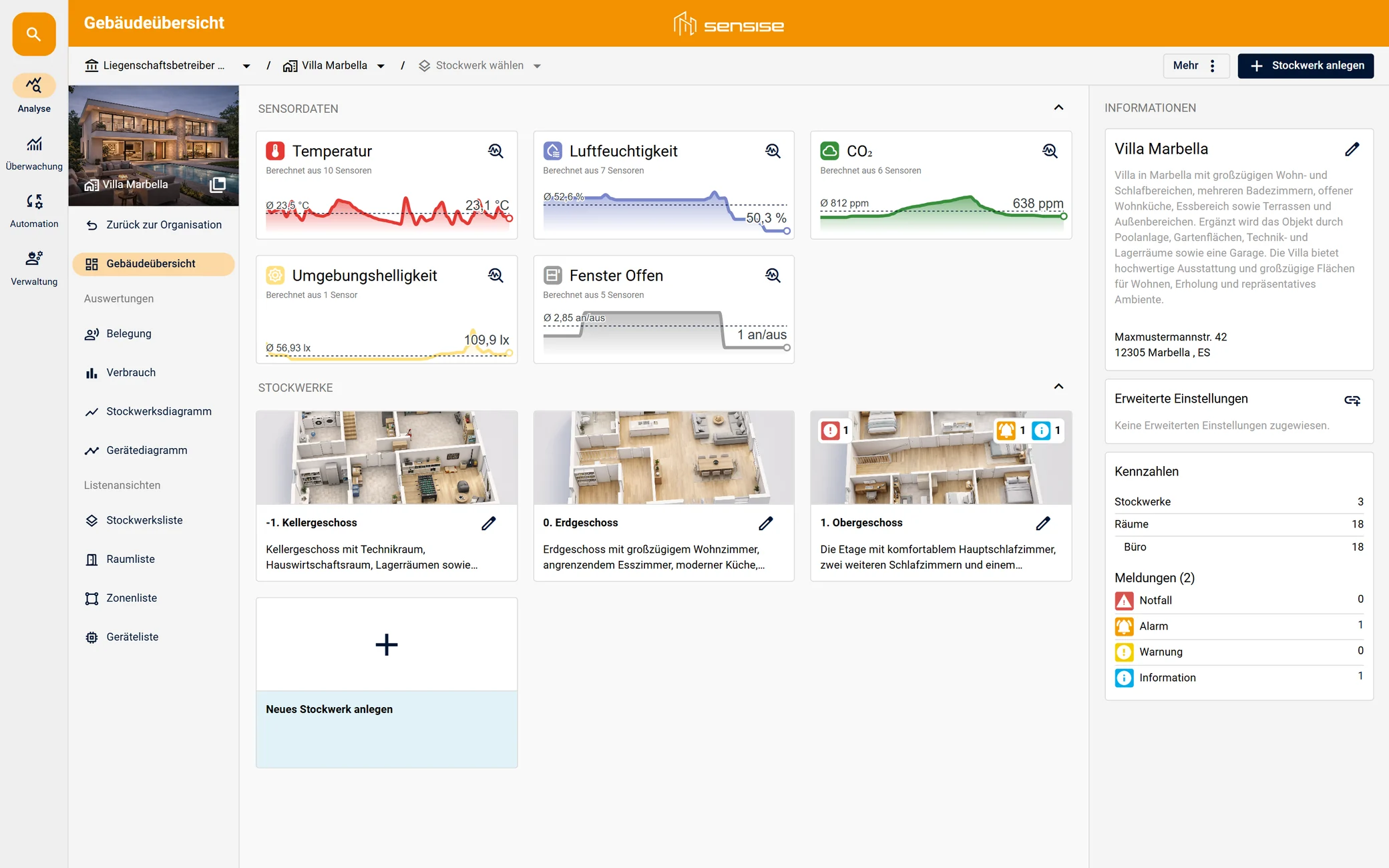
Analysis, monitoring and control on six levels, from the organisation down to the individual device. This way one instance can represent a single property as well as a portfolio across several sites.
Modules
Organisation, building, floor, room, zone and device.
Measured value histories per device, room and building section.
Thresholds per measured variable with an alert level of your choice and notification by email.
Room temperature schedules, separate for weekdays and weekends, plus schedules for switching actuators.
Devices, user accounts, groups and permissions down to room level.
Structure
From the organisation down to the individual device: one instance represents a single property as well as a portfolio across several sites.
Analysis
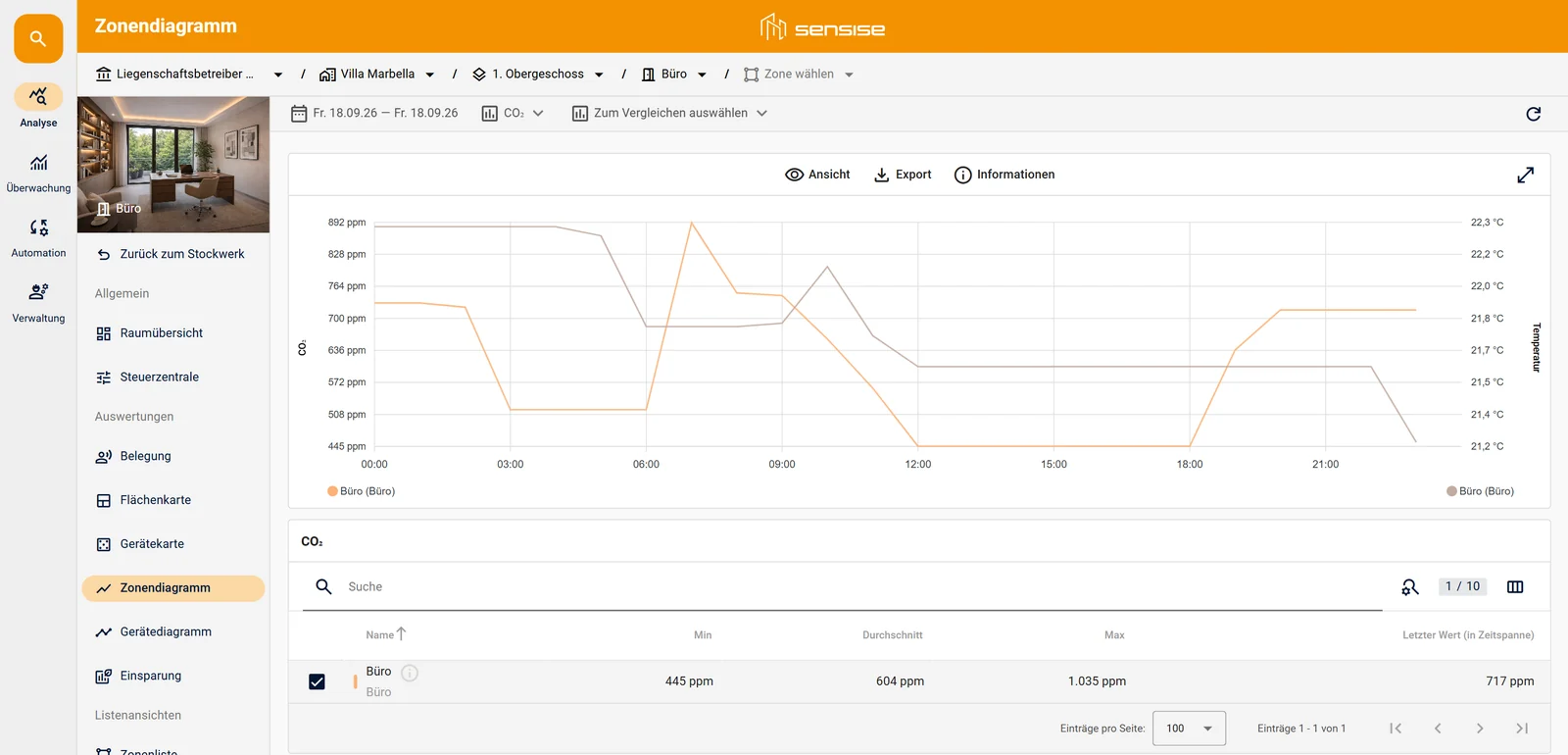
The platform displays every measured variable a device supplies. You select the period and measured variable and see the history per device, per room or per building section.
CO₂, temperature and humidity show how well a room is ventilated. The platform assigns the values to the assessment ranges of ASR A3.6.
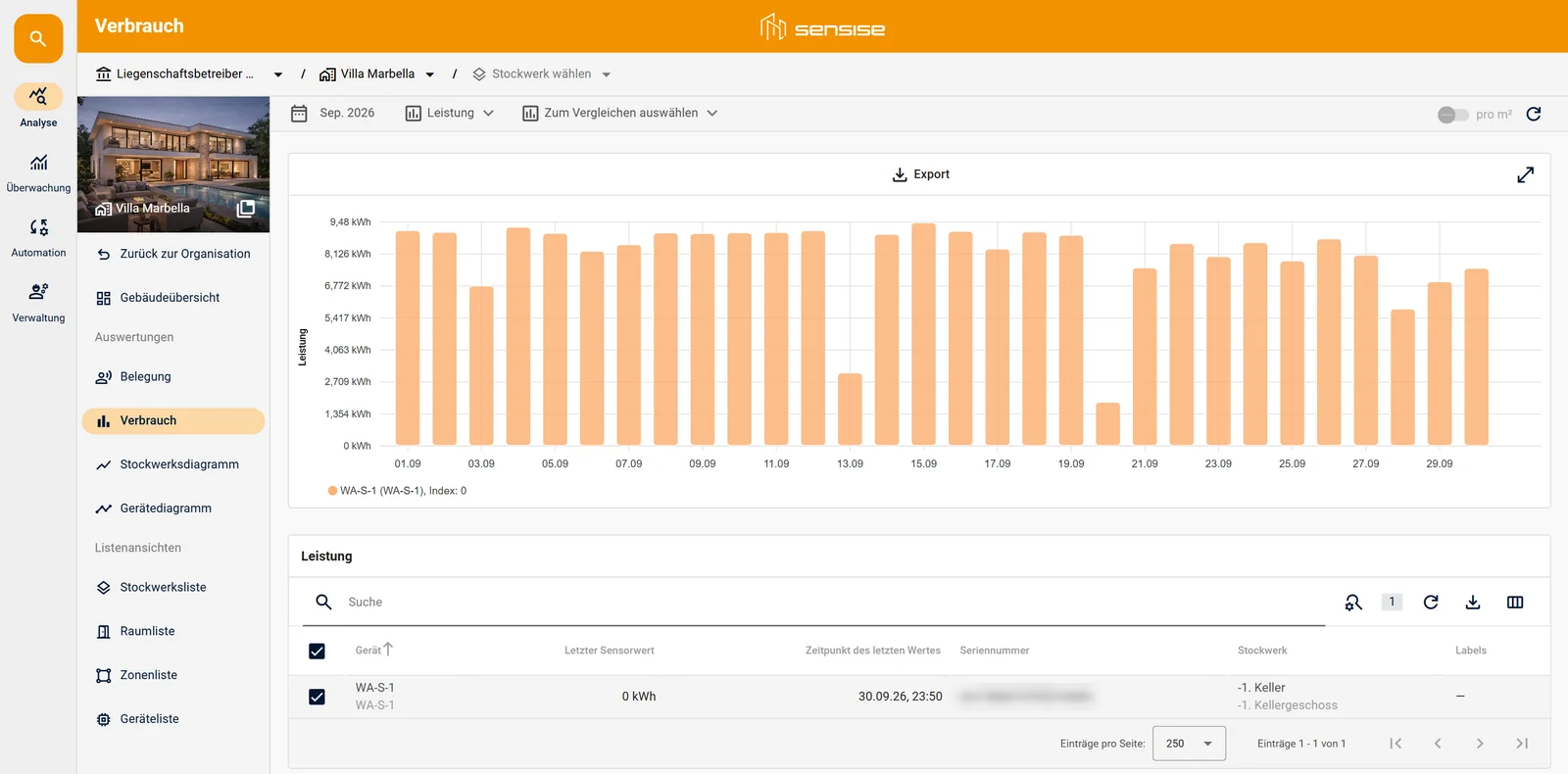
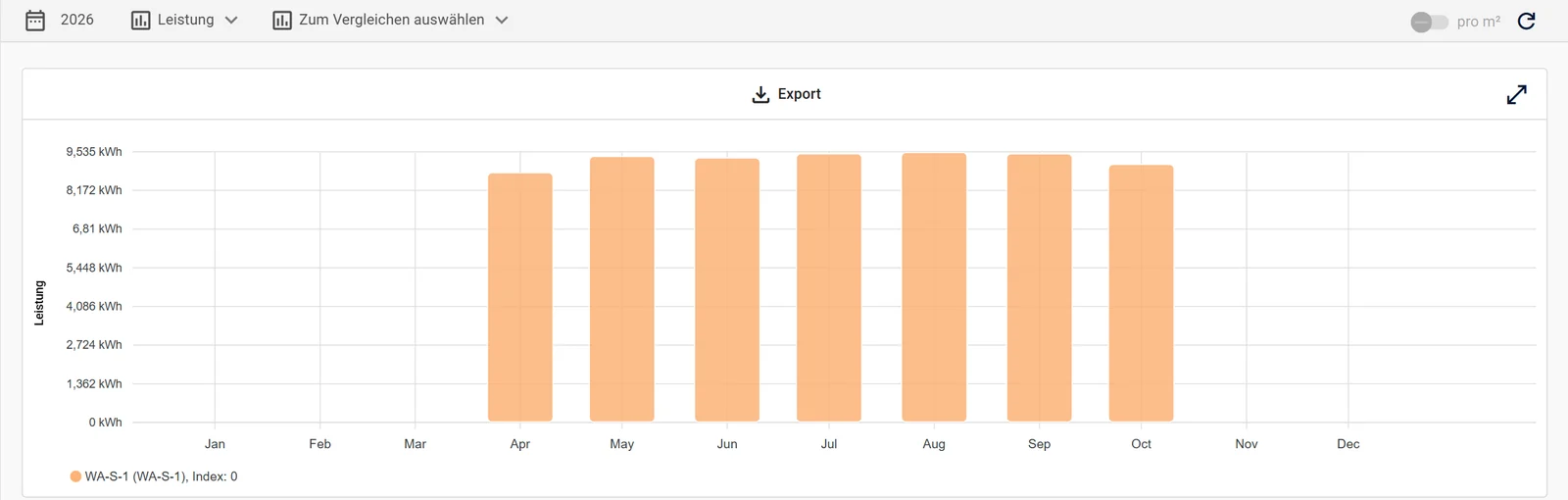
Gas, water and electricity meters supply their values continuously. The platform shows consumption per day, week, month and year.
Two periods can be placed side by side, for example before and after a new control setting or a refurbishment.
Every measured value is stored with a timestamp and can be exported as a CSV file. This provides reports for committees, key figures for energy management under the EnEfG or ISO 50001 and documents for the proof of use.
Rooms heated around the clock, unusual night-time consumption and moisture at critical points are noticed during ongoing operation, not only with the annual bill.
According to the Deutscher Städtetag, low-investment measures save 10 to 20% of annual energy consumption in existing buildings.2 The period comparison shows how much of that reaches your building.
¹ Umweltbundesamt, Richtig Lüften in Schulen · ² Deutscher Städtetag, Einsparung durch Energieverbrauchscontrolling im kommunalen Gebäudebestand, Hinweise Nr. 2.1, March 2025 · The views on this page are redrawn and show sample data.
Monitoring
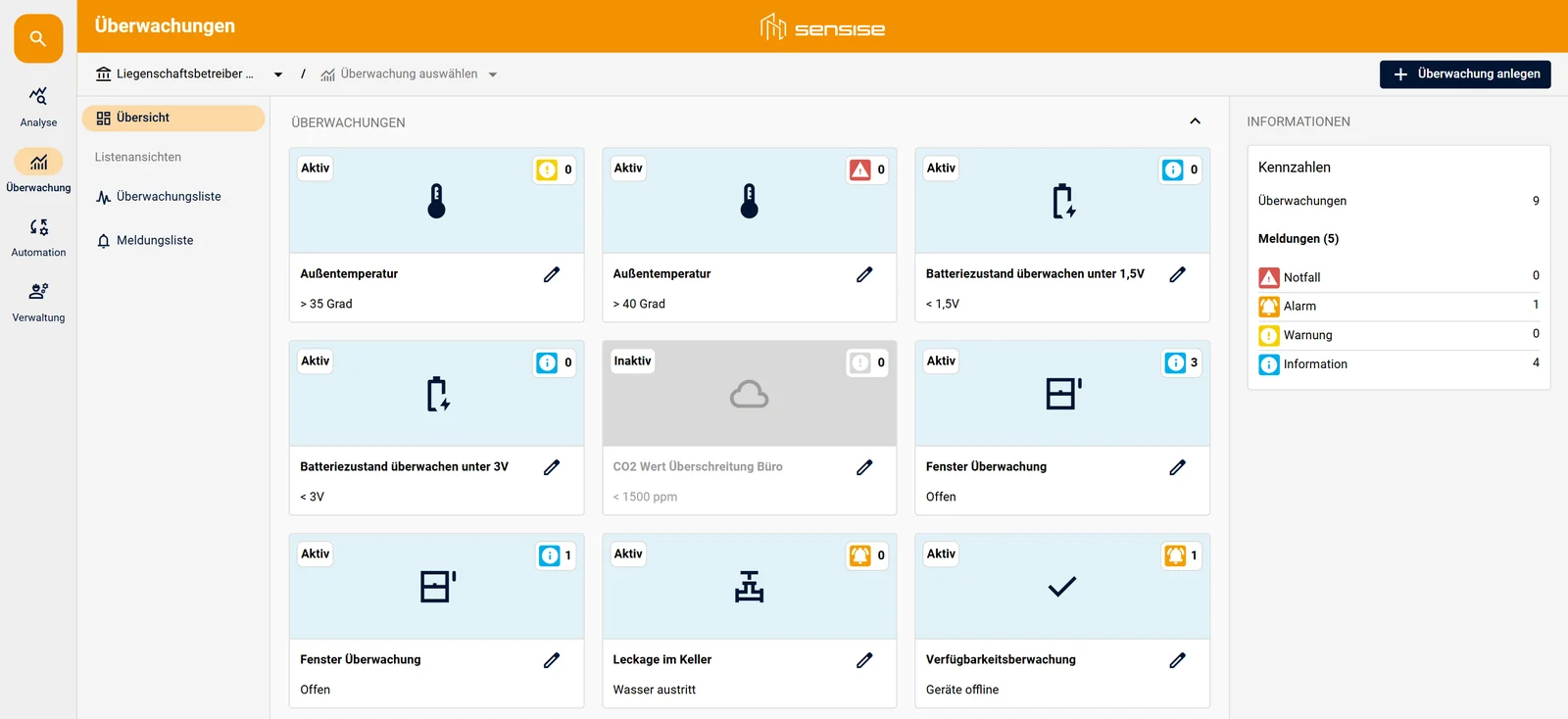
Every measured variable can be monitored with its own rules. A rule defines the threshold, alert level and recipients. When the threshold is exceeded, an email goes to the recipients and the alert appears in the property's alert list.
Instead of walking through rooms, basements and plant areas at regular intervals, you are notified by the platform when something deviates from normal, around the clock and at weekends too.
| Example rule | How it works | Selected level |
|---|---|---|
| Water leak | The leak detector has two states. The rule triggers as soon as it detects water. | Emergency |
| Temperature above 40 °C | Two rules on the same measured variable, with different levels: a notice from 35 °C, an alarm from 40 °C. | Alarm |
| Battery voltage | Two thresholds for two device classes: below 3 V and below 1.5 V. | Warning |
| Window status | Open or closed. Combined with the history, this becomes the after-hours check. | Notice |
| CO₂ level | Thresholds based on the assessment ranges of ASR A3.6: below 1,000 ppm no action, 1,000 to 2,000 ppm ventilate, above 2,000 ppm further measures. | Notice |
| Device availability | If a device sends no data for some time, the platform reports it, often before anyone in the building notices. | Alarm |
Control
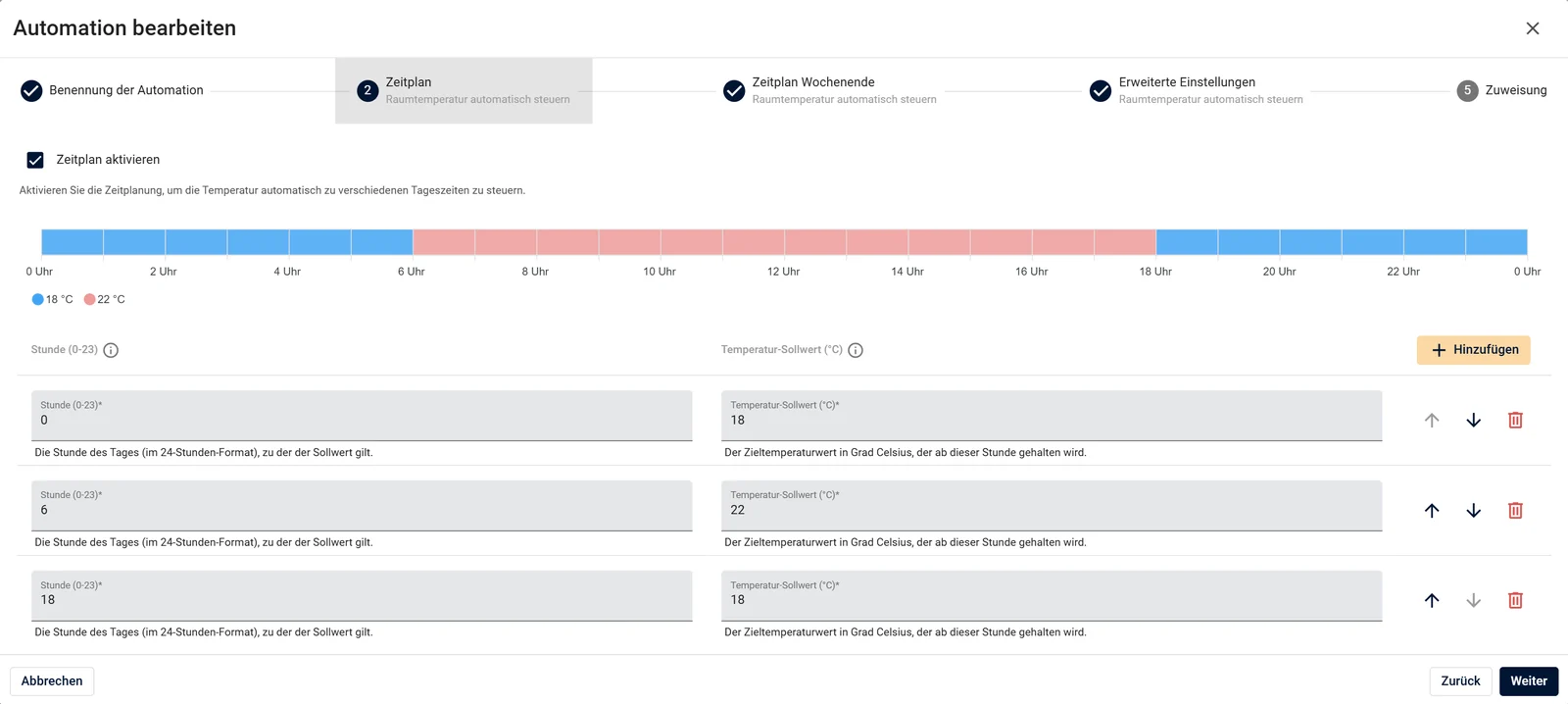
Each room follows its own daily profile. The set temperature drops at night, in the evening and as soon as nobody is in the room. When a window is open, the heating stops.
For each control setting you define which set temperature applies from which hour. A separate schedule for the weekend can be added if required.
You then assign the control setting to individual devices, rooms or entire floors. Changes take effect without a site visit.
Heating control
Valve actuators on the radiators control each room according to its schedule.
Switching actuators
Some loads only know on and off. They run on a schedule via switching actuators.
Administration
Permissions
Devices
Integration
Operation
Computing power, storage and database are located in a data centre in the Frankfurt area. The certificates and attestations in the table are evidence provided by the data centre operator.
| Location | Data centre in the Frankfurt area, computing power, storage and database in Germany |
| Privacy policy | GDPR-compliant, with data processing agreement |
| ISO/IEC 27001, 27017, 27018, 27701 | Certification of the data centre operator for this location |
| BSI C5 Type 2 | Attestation of the data centre operator 01/2026, location within the audit scope |
| TISAX AL3 | Evidence of the data centre operator, location within the audit scope |
| Evidence | Audit reports on request as part of a tender |
In the demo we go through a property with fictitious building names: structure, floor view, a time schedule and a threshold rule. Afterwards you will know whether the interface suits your operations.
FAQ
The platform combines five modules: Structure (Organisation, Building, Floor, Room, Zone, Device), analysis of measured values, monitoring with thresholds and alert levels, control with schedules per room, and administration of devices, user accounts and permissions. It runs in the browser, no installation is required. One instance represents a single property as well as a portfolio across several sites.
Computing power, storage and database are located in a data centre in the Frankfurt area, and operation is GDPR-compliant with a data processing agreement. The data is encrypted in transit and at rest. The data centre operator is certified to ISO/IEC 27001, 27017, 27018 and 27701 and holds a BSI C5 Type 2 attestation and TISAX AL3 evidence for the location. We provide the audit reports as part of a tender.
Yes. The platform exports measurement series as CSV files, sends live values via MQTT and makes them available for retrieval via the REST API, without an additional contract. If you already work with a leading platform, such as a building management system, a CAFM or an energy management system, we pass the data to it.
Every measured variable can be monitored with its own rules: threshold, alert level and recipients. When the threshold is exceeded, an email goes to the recipients and the alert appears in the property's alert list. There are four alert levels, from Emergency to Notice. A device that stops sending data or a low battery is also reported.
Valve actuators on the radiators control each room according to a daily profile with one setpoint per hour, with a separate weekend schedule if required. When a window is open the heating stops, and when nobody is present it sets back. You assign control settings to individual devices, rooms or entire floors, and changes take effect without a site visit.
The number of user accounts is unlimited. You assign visibility and permissions via permission sets per property, floor and room. This way the facility team sees its own building and management sees all buildings.
Yes. In a demo of about thirty minutes we go through a property with fictitious building names: structure, floor view, a time schedule and a threshold rule. We never show building operators' data to anyone.